>
Delivery Agents & Partners>
uParcel Launches Compulsory Waybill Scanning for Shopee, Lazada and TikTok Shop Orders
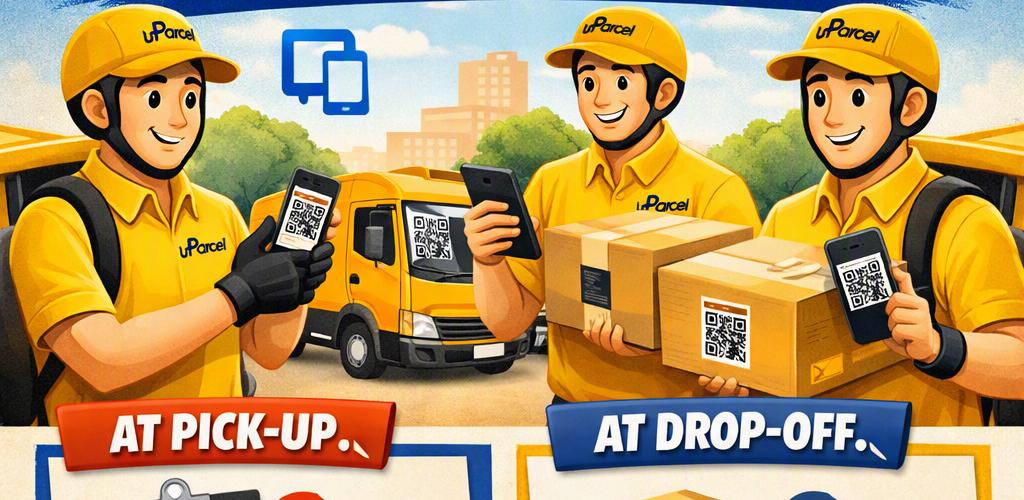
uParcel Launches Compulsory Waybill Scanning for Shopee, Lazada and TikTok Shop Orders

Er Cai Fang
Senior Product Manager
uParcel Launches Compulsory Waybill Scanning for Shopee, Lazada and TikTok Shop Orders
From 7 October 2026, waybill scanning is compulsory for every official Shopee, Lazada and TikTok Shop order uParcel collects and delivers. Riders must scan the waybill at pick-up and again at drop-off, so each parcel is matched to the correct order before it leaves the seller and before it reaches the buyer. If a marketplace order has no waybill, the collection will be failed. If the waybill is there but too damaged or unclear to scan, report it through the uParcel in-app chat with the tracking number.
The goal is simple: no more wrong pick-ups and no more wrong deliveries. This article explains which orders are covered, how waybill scanning works, what changes for sellers, and how to make sure your labels scan first time.
What is compulsory waybill scanning?
Waybill scanning means reading the barcode or QR code on a parcel’s shipping label to confirm it matches the delivery job before it moves. Making it compulsory means a marketplace parcel’s status is only updated through a scan, at both ends of the journey.
The waybill is the shipping label your marketplace generates when you arrange shipment. It carries the tracking number, the buyer’s delivery details and a machine-readable code. When a rider scans it, the tracking number is checked against the job in the rider’s app. A match confirms the parcel is the right one. A mismatch stops the parcel before a mistake happens.
Which orders need waybill scanning?
Only official marketplace orders. Non-marketplace orders, such as orders arranged directly with uParcel, are not affected.
|
Order type |
Waybill scan required? |
|
Official Shopee, Lazada and TikTok Shop orders |
Yes. Scan at pick-up and at drop-off. No waybill means the collection is failed. |
|
Non-marketplace orders |
No. Status can still be updated without scanning a waybill. |
Why is uParcel making waybill scanning compulsory?
Most wrong pick-ups and wrong deliveries come from the same root cause: a person matching a parcel to a job by eye. A scan replaces that judgement call with a check that either passes or fails.
Wrong pick-ups
At a seller’s premises, parcels for different couriers, different platforms or different days often sit side by side in near-identical polymailers. A rider reading labels in a hurry can easily take a parcel meant for another courier or leave one behind. Scanning each waybill at pick-up confirms that only parcels belonging to that job get loaded.
Wrong deliveries
In Singapore’s HDB blocks and condominiums, neighbouring units and similar addresses are a common source of mix-ups. So are parcels that shift around inside a van during the day. Scanning at the door confirms the parcel in the rider’s hand belongs to that address before it is handed over.
Clearer tracking for disputes
When a buyer says an order never arrived, marketplace disputes usually come down to what the tracking record shows. A scan at pick-up and a scan at drop-off give you a time-stamped record of when your parcel left your hands and when it reached the buyer.
How does waybill scanning work at pick-up and drop-off?
Every marketplace parcel is scanned twice: once when it is collected and once when it is delivered. The table below shows what happens at each step.
|
Stage |
What the rider does |
What it confirms |
|
Pick-up |
Scans every waybill before the parcel goes into the vehicle. |
The parcel belongs to this pick-up job and this marketplace order. Status updates to collected. |
|
Drop-off |
Scans the waybill at the delivery address before handing the parcel over. |
The right parcel is at the right address. Status updates to delivered. |
|
No waybill |
Does not collect the parcel. |
The collection is marked as failed. No parcel moves without a waybill. |
|
Unclear waybill |
Reports it through the uParcel in-app chat with the tracking number. |
The uParcel team verifies the order before the parcel moves. |
Riders scan with their phones, so sellers do not need new equipment. What sellers do need is a waybill that is present, intact and readable.
What if a parcel has no waybill or the waybill can’t be scanned?
It depends on whether the waybill is missing or just unreadable. A missing waybill on a marketplace order means a failed collection. An unclear or damaged waybill should be reported through the uParcel in-app chat with the tracking number.
No waybill: the collection will be failed
If an official Shopee, Lazada or TikTok Shop order has no waybill, the rider will not collect it and the collection will be marked as failed. Please do not ask the rider to take an unlabelled parcel “just this once”. Print the waybill from your marketplace seller centre and attach it before the parcel is handed over.
Unclear or damaged waybill: report it in the app
- Report it through the in-app chat. Message uParcel through the in-app chat and quote the parcel’s tracking number.
- Reprint the waybill. Sellers can reprint the shipping label from their marketplace seller centre and replace the damaged one.
- Let the uParcel team verify. The team will check the order and advise on the next step, so the parcel moves with a correct, scannable label.
Common reasons a waybill won’t scan
- Faded or patchy printing from a worn thermal print head or low-quality label rolls
- Labels wrapped around a corner or edge, so the barcode is bent
- Glossy tape over the barcode causing glare
- Labels that got wet, smudged or torn in transit
- An old label from a reused box still showing next to the new one
- Labels shrunk down when printed, making the code too small to read
How can sellers make sure every waybill scans first time?
A few packing-table habits prevent almost every scanning problem. Use this checklist before parcels go out.
- Print at full size. Use your marketplace’s recommended label size and printer settings. Do not scale the label down.
- Check print quality. If barcodes look faded or streaky, clean the thermal print head or replace the label roll.
- Stick labels flat. Place the waybill on the largest flat surface of the parcel, away from seams, edges and corners.
- Keep the code clear. Do not tape over the barcode or QR code. If you must protect the label, use a clear label pouch or matte tape.
- Remove old labels. On reused boxes, peel off or fully cover any previous waybill so there is only one code to scan.
- One waybill per parcel. For orders split across several parcels, follow your platform’s instructions so each parcel carries its own label.
- Protect against rain. Soft polymailers can get wet during pick-up. A waterproof label or pouch keeps the code readable.
- Have parcels ready. Label and stage parcels before the rider arrives, separated from parcels for other couriers.
What does compulsory waybill scanning change for sellers?
For most sellers, very little changes on their side. The main difference is that a marketplace parcel without a waybill will not be collected, and an unreadable waybill will be reported instead of quietly going out.
In return, sellers get more reliable tracking on Shopee, Lazada and TikTok Shop, fewer parcels going to the wrong place, and a clearer record when an order is disputed. Because uParcel runs its own warehouse at Defu South Street 1 and its own delivery fleet, the scan rule is built into every marketplace job its riders handle, at pick-up and at the door.
Frequently asked questions
Is waybill scanning compulsory for all marketplace orders?
Yes. From 7 October 2026, every official Shopee, Lazada and TikTok Shop order collected and delivered by uParcel must be scanned at pick-up and at drop-off.
Do non-marketplace orders need a waybill scan?
No. Non-marketplace orders can still be updated without scanning a waybill.
What happens if my marketplace parcel has no waybill?
The rider will not collect it, and the collection will be marked as failed. Print the waybill from your seller centre and attach it before handing the parcel over.
How do I report an unclear waybill to uParcel?
Use the in-app chat and include the parcel’s tracking number. The uParcel team will verify the order and advise on the next step.
Other Blog Posts

Free N95 Masks for uParcel Motorcycle Riders During the Haze
uParcel is giving free N95 masks to all its motorcycle riders while the haze affects Singapore. Riders can collect them at the uParcel warehouse at 6 Defu South Street 1, #05-24, from Monday to Friday, 10am to 5pm. Motorcycle riders spend hours on the road breathing outdoor air, so a well-fitted N95 mask is one of the simplest ways to cut their exposure to haze particles. This article covers how to collect your masks, why we are giving them out, and how to wear an N95 properly under a helmet. Where and when can riders collect free N95 masks? Drop by the uParcel warehouse in Defu Industrial City on any weekday between 10am and 5pm. Detail What you need to know Who All uParcel motorcycle riders What Free N95 masks When Monday to Friday, 10am to 5pm. Closed on weekends and public holidays. Where uParcel warehouse, 6 Defu South Street 1, #05-24, Singapore 533757 Cost Free If you ride through Defu during the day, plan a quick stop between jobs. Collection is closed on Saturdays, Sundays and public holidays. What is the haze situation in Singapore right now? The haze has worsened this week. On 9 October 2026, the 24-hour PSI in the central region reached 181, the highest reading so far this year and well inside the Unhealthy range. The National Environment Agency (NEA) has linked the haze to smoke from fire hotspots in Sumatra and West Kalimantan, carried to Singapore by south-easterly and southerly winds. As long as those winds continue, readings can stay high or rise further. Check the latest PSI on the NEA website or the myENV app before each shift. Why is uParcel giving away free N95 masks during the haze? Because riding is outdoor work, and our riders cannot work from home when the PSI goes up. A motorcycle rider breathes outdoor air for the whole shift, often in traffic, with no cabin or air-conditioning between them and the haze. Riders are outdoors for hours, not minutes The Ministry of Health (MOH) says N95 masks are not needed for short exposures such as commuting. The picture changes for people who spend several hours outdoors. MOH advises that healthy people outdoors for hours in hazardous conditions can reduce their exposure by wearing a well-fitted N95 mask. A full delivery shift is exactly that kind of prolonged exposure. Outdoor workers need protection at lower PSI levels The Ministry of Manpower (MOM) recommends masks for outdoor workers at a lower PSI than for the general public, because their work keeps them outside for long periods on a regular basis. When the 24-hour PSI is in the Very Unhealthy range (201 to 300) and outdoor work cannot be avoided, MOM strongly urges that masks be provided. Having masks ready before PSI spikes We would rather riders have masks in their bags before readings climb than try to find them on a bad haze day. Giving them out now means every rider can start their shift protected. When should motorcycle riders wear an N95 mask? Our advice is simple: mask up when PSI is up. If the 24-hour PSI is in the Unhealthy range or higher and you will be riding for several hours, wear your N95. The table below matches MOH’s advice for healthy persons with what it means for a rider. 24-hour PSI MOH advice for healthy persons What it means on the road 0–100 (Good to Moderate) Normal activities Ride as usual. Keep a mask in your bag in case readings rise. 101–200 (Unhealthy) Reduce prolonged or strenuous outdoor physical exertion Wear your N95 on long shifts. Take indoor breaks and drink water. 201–300 (Very Unhealthy) Avoid prolonged or strenuous outdoor physical exertion Wear your N95 whenever you ride. MOM strongly urges masks for outdoor work that cannot be avoided at this level. Above 300 (Hazardous) Minimise outdoor activity Wear your N95 and keep time on the road to a minimum. Riders who are older, pregnant, or have heart or lung conditions should check with a doctor before using an N95 mask, as MOH and MOM both advise. How do you wear an N95 mask properly under a helmet? An N95 only works if it seals against your face. A loose mask lets haze leak in around the edges, so take a minute to fit it properly before you put your helmet on. Pinch the nose clip. Shape the metal strip firmly around the bridge of your nose with both hands. Use both straps. Fit the straps as the mask is designed so it sits snugly over your nose and under your chin. Check for leaks. Breathe out sharply. If you feel air escaping at the edges, adjust the nose clip and straps until it stops. Put your helmet on carefully. Make sure the chin bar or cheek pads do not push the mask out of place. Check the seal again once the helmet is on. Watch your visor. If your visor fogs up quickly, air is probably leaking out at the top of the mask. Pinch the nose clip again. When to change your mask Replace your N95 when it is dirty, wet or damaged, or when it becomes hard to breathe through. Facial hair can stop the mask from sealing properly, so a clean shave gives a better fit. Know when to stop N95 masks make breathing harder work. Take regular breaks indoors and drink plenty of water. If you feel breathless, dizzy or unwell while riding with a mask, pull over somewhere safe, remove the mask and rest. Frequently asked questions Who can collect the free N95 masks? All uParcel motorcycle riders. Can I collect masks on Saturday or Sunday? No. Collection is on weekdays only, from 10am to 5pm. The warehouse is closed for collection on weekends and public holidays. Do I need an N95 mask for a short ride? MOH says N95 masks are not needed for short exposures like commuting. Riders are different because they are outdoors for hours, so wear your mask for full shifts when the PSI is high. Where can I check the PSI before my shift? Check the NEA website or the myENV app for the latest 24-hour PSI and 1-hour PM2.5 readings. Sources NEA, Haze Situation Update (8 October 2026): https://www.nea.gov.sg/media/news/advisories/index/haze-situation-update-8-october-2026 MOH, Haze health advisory: https://www.moh.gov.sg/others/haze/ MOM, Guidelines on protecting employees from haze: https://www.mom.gov.sg/haze/guidelines-on-protecting-employees-from-haze MOM, Why are masks recommended for outdoor workers at lower PSI: https://www.mom.gov.sg/faq/haze/why-are-masks-recommended-for-outdoor-workers-at-lower-psi-than-for-the-general-public
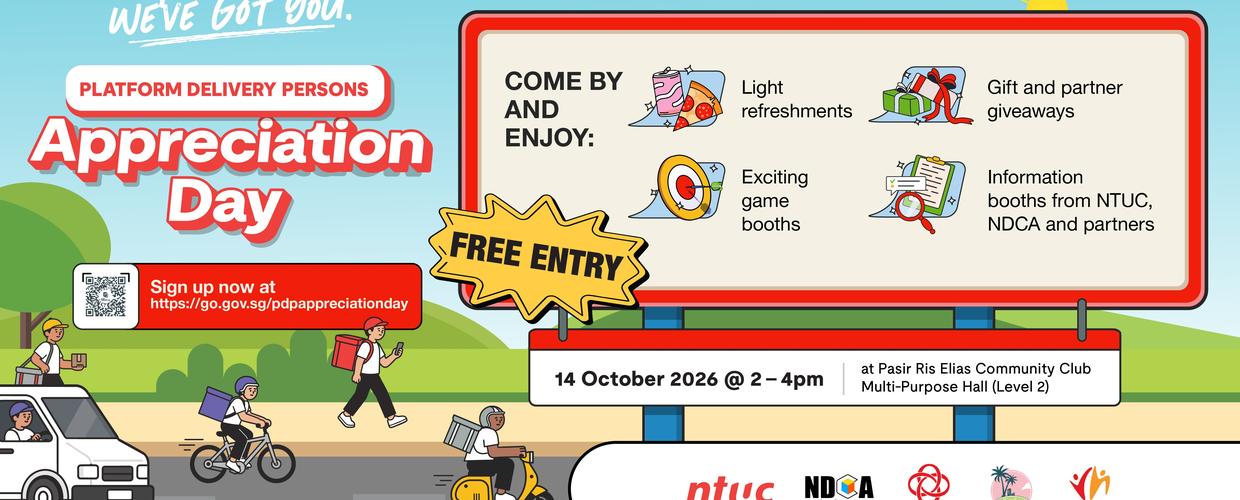
NTUC Platform Delivery Persons Appreciation Day
NTUC’s Platform Delivery Persons Appreciation Day Calling all Platform Delivery Persons! Enjoy complimentary refreshments, game booths and giveaways just for you. Date: 14 Oct 2026 Time: 2pm – 4pm Venue: Pasir Ris Elias Community Club, Multi-Purpose Hall (Level 2) Register here: https://go.gov.sg/pdpappreciationday

uParcel’s September Peak Mooncake Delivery Could Earn a Paris Trip 🇫🇷🥮
Mid-Autumn comes once a year. So does the annual moment of mooncakes gifting. Do a seasonal delivery this September with uParcel, fly yourself to Paris. At least 40 drops a day, at $8 take home. That's almost $7000+ in 3 weeks! This September-only seasonal deliveries built around clustered zones and auto-optimised routes. Miss the cycle, and you have to wait for it next year. Read programme details here. Why clustered September routes matter? The practical value is choosing delivery zones close to home, while slots remain available. Clustered drops can mean less petrol. You also enjoy fewer long hops between deliveries, more stops within a sensible area. There is a catch, naturally. Zones fill up. Choosing late may mean your preferred area is already taken. WhatsApp Us Now To Apply (+65 8999 6043) Auto-routed drops, not a puzzle at breakfast Auto-optimised routes remove one of delivery work’s least glamorous jobs: manually deciding what goes where and in what order. Instead of playing part-time logistics planner before your first coffee, you receive a route arranged for the day’s drops. Optimisation does not magically eliminate traffic, rain or the person who writes ‘call me when downstairs’ and then vanishes. But it can reduce avoidable backtracking, helping seasonal delivery runs feel less like a scavenger hunt. A seasonal route with an actual deadline For anyone already considering September delivery work, the appeal is straightforward: select a nearby available zone, complete a clustered, planned route, and check the campaign terms for eligibility and trip details. The Paris incentive is the headline; saving fuel and time may be the part that makes the route worth doing even before the boarding pass enters the picture. September is brief. Mooncake season is briefer. Pick your zone before somebody else picks the one five minutes from your front door.